Unused Universe Objects
Find the universe objects that no document uses and remove them, so business users see a smaller, clearer universe.
Goal
Universes give business users a view of the database in business terms. Over time they collect objects nobody uses. In the EMPLOYEE table below, six attribute columns are exposed as objects but never used in a report:
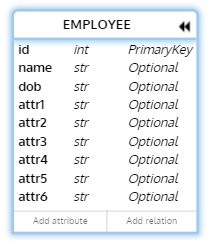
| Data type | Column | Description |
|---|---|---|
| C | NAME |
employee name |
| C | EMP_ID |
employee id |
| C | HIRE_DATE |
hire date |
| N | DOB |
date of birth |
| N | EMP_ATTR_001 to EMP_ATTR_006 |
attributes 001 to 006 (not used) |
You want a list of such objects per universe, proof that no document uses them, and a safe way to remove them.
Who
Universe designers and BI administrators.
Before you begin
- MetaMiner collects universe and Web Intelligence detail for the environment. See Document Processing.
- The standard report pack is installed, or you use Meta Query.
- You can edit the universe in the Universe Design Tool (UNV) or Information Design Tool (UNX).
Scope of the analysis
"Unused" means no Web Intelligence, Lumira or Crystal Reports document in the environment uses the object. Objects used only by other tools that query the universe are not seen.
Steps
Find unused objects
- Run MM-U10 Unused Objects Summary for the environment to see which universes have the most unused objects.
- Drill into MM-U11 Unused Objects UNV or MM-U12 Unused Objects UNX for the object list of one universe.
- Use MM-U13 Unused Objects Detail to check the per-document analysis.
Image of MM-U12 listing unused objects of one UNX universe here
../images/use-cases/unused-objects-mm-u12.png
Double-check before you remove
- In the CMS Explorer, right-click the universe and choose Impact Analysis to see the documents that use it.
- For one document, run IK-007 WebI Unused Objects from the SQL Script Catalog to see which of its query objects are used.
Back up and change the universe
- Back up the universe with a Backup/Promote job, or right-click it and choose Save as BIAR Backup....
- Remove or hide the unused objects in the Universe Design Tool or Information Design Tool and publish the universe.
- Refresh a sample of the documents on the universe, or run a Report Validation report set, to confirm they still work.
Expected result
A smaller universe with only the objects reports use, a backup of the previous version, and evidence that existing documents still refresh.
Variations
- Unused query objects inside documents, not universes: see Web Intelligence Query Stripping.
- Unused documents: see Content Cleanup.