Server to BusinessObjects SSL
Connect the MetaMiner Server to a BusinessObjects cluster whose CMS and servers use CORBA SSL.
How it works
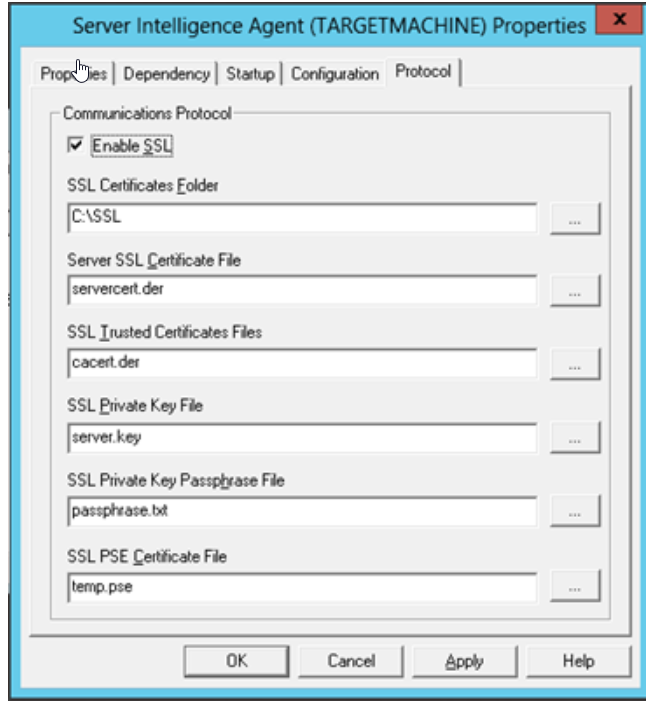
The MetaMiner Server (MMS) talks to the CMS and other BusinessObjects servers through the BusinessObjects SDK, over CORBA. When the cluster has CORBA SSL turned on in the Server Intelligence Agent (SIA), every SDK client, MetaMiner included, needs a copy of the SSL certificate set. You give MetaMiner the location of that set per BusinessObjects environment in MetaMinerServer.properties.
MetaMiner can connect to SSL and non-SSL BusinessObjects environments at the same time.
This page covers the SDK (CORBA) connection. The HTTPS connection to the BusinessObjects RESTful web service is covered in Trusted Certificates.
Before you begin
- CORBA SSL is configured on the BusinessObjects cluster. Follow the SAP guides:
- SSL for SAP BI 4.2 SP5 and later (PDF)
- SSL for SAP BI 4.2 before SP5 (PDF)
- The SAP BusinessObjects Business Intelligence Platform Administrator Guide for your version, section on configuring servers for SSL.
- The SSL folder from the BusinessObjects server: the trusted CA certificate, the server certificate, the key file and the passphrase file.
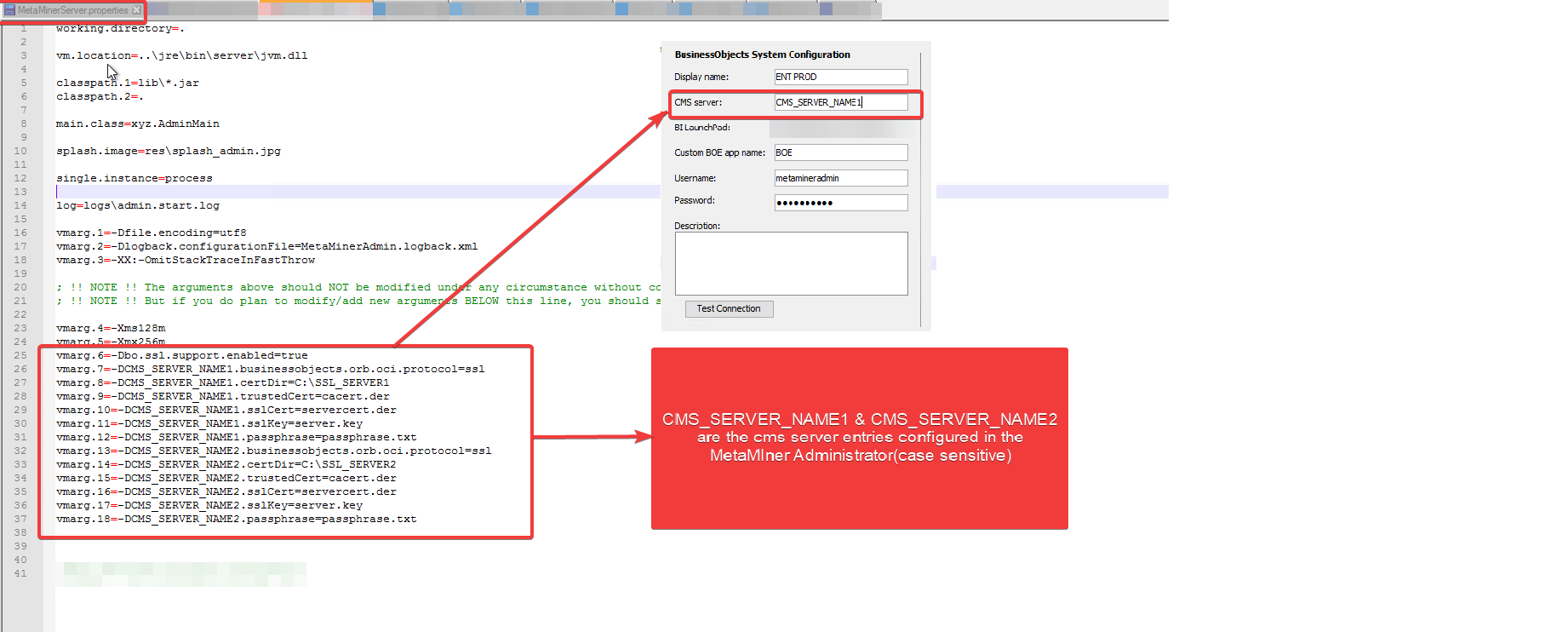
- The CMS Host value exactly as entered for the environment in the MetaMiner Administrator (MMA).
Steps
- Copy the SSL certificate folder from the BusinessObjects server to the MetaMiner Server host, for example
C:\SSL. For several clusters, use one folder each, for exampleC:\SSL_SERVER1andC:\SSL_SERVER2. - Limit read access on those folders to administrators and the MetaMiner service account. They contain a private key and its passphrase.
- In the server folder (
C:\Program Files\Infolytik\MetaMiner\server\), openMetaMinerServer.properties. If it does not exist, copyMetaMinerServer.properties.customizetoMetaMinerServer.properties. -
Add these entries. Replace
CMS_SERVER_NAME1with the CMS Host value of the environment, and the file names with the names in your SSL folder:server\MetaMinerServer.properties (excerpt)bo.ssl.support.enabled=true CMS_SERVER_NAME1.businessobjects.orb.oci.protocol=ssl CMS_SERVER_NAME1.certDir=C:\\SSL_SERVER1 CMS_SERVER_NAME1.trustedCert=cacert.der CMS_SERVER_NAME1.sslCert=servercert.der CMS_SERVER_NAME1.sslKey=server.key CMS_SERVER_NAME1.passphrase=passphrase.txtRepeat the block with
CMS_SERVER_NAME2for each further SSL environment. Leave out environments that do not use SSL.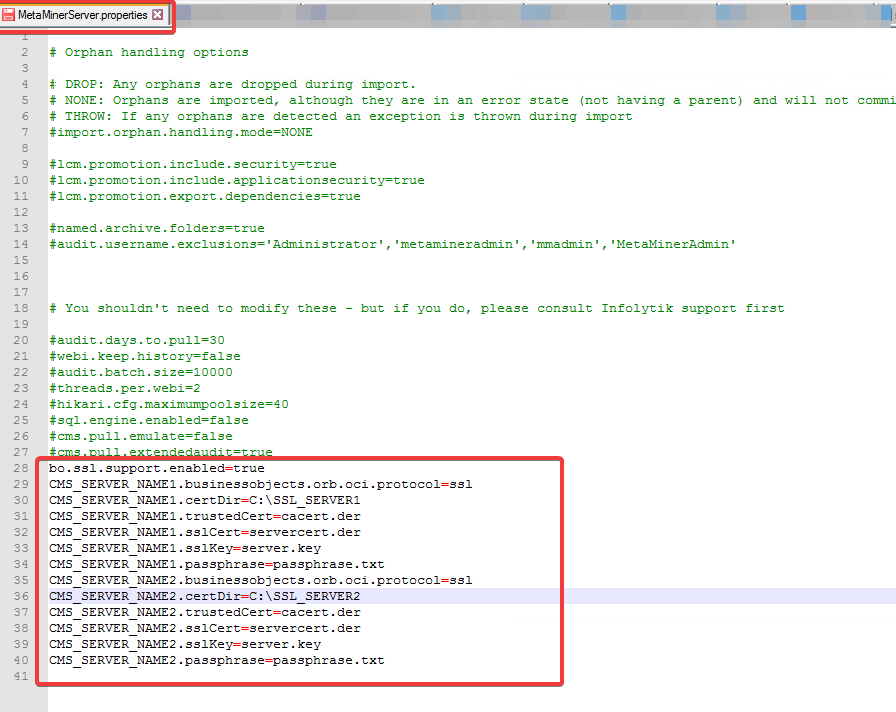
-
Save the file.
- In MMA, validate the environments. MMA reads
MetaMinerServer.propertieswhen it starts, so restart MMA first if it was open. - Restart the MetaMiner Server service.
| Entry | Meaning |
|---|---|
bo.ssl.support.enabled |
Turns on per-environment CORBA SSL settings. One entry for the whole server |
<cms>.businessobjects.orb.oci.protocol |
ssl for an SSL environment |
<cms>.certDir |
Folder that holds the certificate set |
<cms>.trustedCert |
File name of the trusted CA certificate in certDir |
<cms>.sslCert |
File name of the certificate in certDir |
<cms>.sslKey |
File name of the key in certDir |
<cms>.passphrase |
File name of the passphrase file in certDir |
<cms>.psecert |
Optional. The PSE certificate file, for BI 4.3 SP3 and later when your cluster uses one |
Special characters in .properties files
Write each backslash in a path twice (C:\\SSL_SERVER1) or use forward slashes (C:/SSL_SERVER1). If the CMS Host includes a port, escape the colon in the entry name, for example boserver\:6400.certDir=C:\\SSL_SERVER1.
Older installations: JVM arguments in MetaMinerAdmin.ini
Older guides also added the same entries as vmarg lines to MetaMinerAdmin.ini. This is not needed when MMA is started from its shortcut, because MMA reads MetaMinerServer.properties at startup. Keep existing lines if you have them; the vmarg numbers must continue from the last number in the file without gaps.
Verify
- In MMA, the environment validates successfully.
- After the MetaMiner Server restarts, the first pull of that environment completes. See Verify the First Pull.
Troubleshooting
Validation fails only for the SSL environment
- The prefix does not match the CMS Host entered in MMA. Use exactly the same value.
- A file name in the entries does not match the file in
certDir. - The SSL folder is from another cluster or is out of date. Copy it again after the cluster's certificates change.
Validation works in MMA but pulls fail
The MetaMiner service account cannot read the SSL folder. Check the folder permissions for that account.
TODO: re-test this procedure with a current BI 4.3 support pack and BI 2025
Confirm the file names produced by sslconfig and when psecert is required.