Custom Settings
Add special-case Java system properties to MetaMinerServer.properties when Infolytik Support asks you to, for example to exclude a content type from pulls while diagnosing a problem.
MetaMiner is designed to run without custom settings. Make everyday changes in MetaMiner Administrator.
Supportability
Infolytik does not support configurations made in this file unless Infolytik Support asked for them. These settings change server behaviour and can have unexpected results. Revert them when the diagnosis is over.
Before you begin
- Sign in to the MetaMiner Server machine as an administrator.
- Know the exact property and value Infolytik Support gave you.
Steps
- Open the
serverfolder of the installation, for exampleC:\Program Files\Infolytik\MetaMiner\server\. - Open
MetaMinerServer.propertiesin a text editor. If it does not exist, copyMetaMinerServer.properties.customizetoMetaMinerServer.properties. - Add the property on its own line, or remove the leading
#from an existing line. Lines that start with#are ignored. - Save the file.
- Restart the server; see Start and Stop the Server.
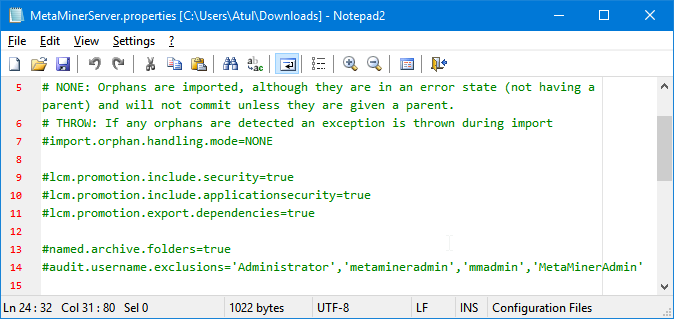
A typical file has every line commented out:
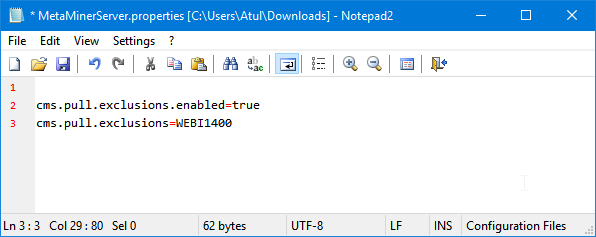
This example tells MetaMiner not to collect Web Intelligence BI4 metadata, but to work normally otherwise:
Survives upgrades
The installer ships only the template MetaMinerServer.properties.customize, so your MetaMinerServer.properties is kept when you install a new release. Values in this file take precedence over the same properties set elsewhere on the Java command line. See Configuration Files.
Common properties
Infolytik Support may provide other properties as needed.
| Property | Effect |
|---|---|
cms.pull.exclusions.enabled=true |
Turns on exclusion mode, which skips the listed pull types for all environments |
cms.pull.exclusions=<type>,<type> |
Pull types to skip, for example WEBI1400. Requires cms.pull.exclusions.enabled=true. Type names are listed in MetaMiner Database Schema. |
cms.pull.inclusions.enabled=true |
Turns on inclusion mode: only the listed pull types are collected |
cms.pull.inclusions=<type>,<type> |
Pull types to collect. Requires cms.pull.inclusions.enabled=true. |
Use MMA for MMA settings
Settings that appear in MMA (for example audit user exclusions or orphan handling) are stored in config.json. Change them in MMA; a line in MetaMinerServer.properties does not override a value MMA has saved.
Verify
server\logs\server.start.loglists every property read from the file at startup.