Database External Connections
Require SSL for ODBC and JDBC clients, such as BusinessObjects universes and reporting tools, that read the MetaMiner Database directly.
How it works
Tools outside MetaMiner can read the MetaMiner Database (MMDB) over ODBC or JDBC, for example the MetaMiner standard universe or your own reports. Each of those connections chooses its own SSL mode. A PostgreSQL server with SSL on accepts both SSL and non-SSL connections unless pg_hba.conf requires SSL, so set both sides.
Before you begin
- SSL is on for the MMDB. See MetaMiner Database SSL.
- The CA certificate that issued the database certificate, to install on each client host.
- A read-only database account for the tool. Do not use the MetaMiner Server's own account. See Direct MMDB Access.
Steps
ODBC (PostgreSQL ODBC driver)
- Open the ODBC Data Source Administrator, 64-bit or 32-bit to match the tool.
- Open the data source for the MMDB.
- Set SSL Mode to
verify-full, or at leastrequire.verify-fullalso checks the server certificate and name. - For
verify-caorverify-full, place the CA certificate as%APPDATA%\postgresql\root.crtof the Windows account that runs the tool, or set the root certificate in the data source options. - Click Test, then Save.
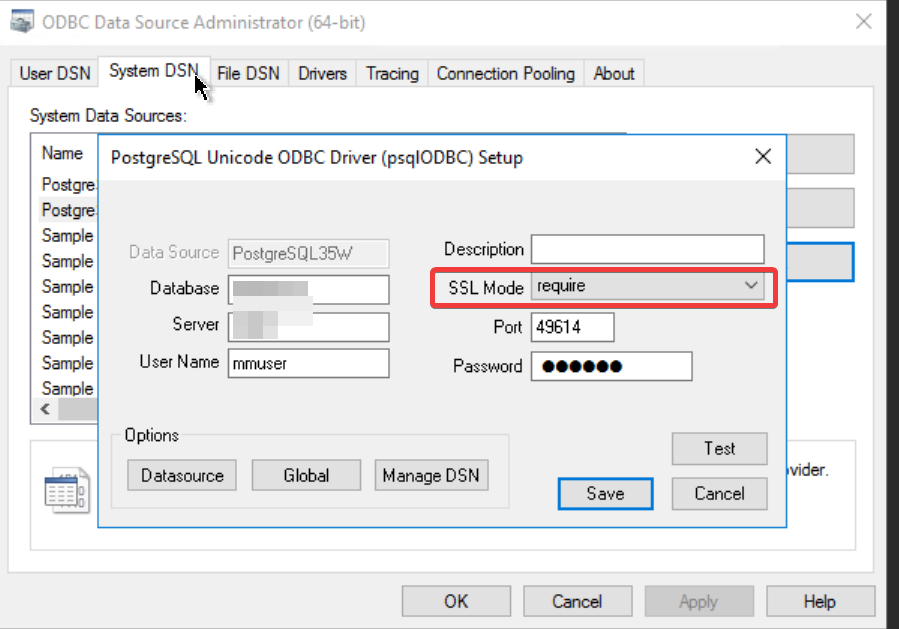
Repeat for both the 64-bit and 32-bit data sources if your tools use both.
JDBC (PostgreSQL JDBC driver)
Add SSL parameters to the connection URL:
jdbc:postgresql://mmdb.company.com:49614/metaminer?sslmode=verify-full&sslrootcert=C:\certs\company-ca.crt
Require SSL on the database
On the embedded database, change the rules under # Infolytik added for outside connections in pg_hba.conf from host to hostssl and limit the addresses. See Restrict which hosts can connect.
Verify
- Test the data source or tool connection.
- On the database,
SELECT * FROM pg_stat_ssl WHERE ssl;lists the encrypted connections.
Troubleshooting
The connection fails with verify-full
The host name in the data source does not match the database certificate, or the CA certificate is missing on the client. Use the name on the certificate and install the CA.
Connections are rejected after changing pg_hba.conf
The client is not in an allowed address range, or connects without SSL to a hostssl rule. Check the client's SSL mode and address.