MetaMiner Database SSL
Encrypt the connection between the MetaMiner Server and the MetaMiner Database (MMDB), and limit which hosts may connect to the embedded database.
How it works
The MMDB is PostgreSQL: either the embedded database installed with MetaMiner (service InfolytikPostgres, port 49614) or an external PostgreSQL server. You turn on SSL in two places:
- On the database server, so it accepts encrypted connections.
- In the MetaMiner Administrator (MMA), so the MetaMiner Server (MMS) connects with SSL.
With SSL on, the MMS verifies the database certificate: it must chain to a CA the MMS trusts, and its name must match the Host in the MMDB configuration.
Before you begin
- A server certificate for the database host, issued by your CA, in PEM format (
server.crt), and its private key in PEM format without a passphrase (server.key). The embedded database starts automatically as a service and cannot prompt for a passphrase. - The certificate of the CA that issued it, in PEM format.
- A maintenance window: the MetaMiner Server and the database restart.
Steps
- Stop the MetaMiner Server service:
net stop metaminer. - Copy
server.crtandserver.keyto the database folderC:\Program Files\Infolytik\MetaMiner\server\data\mmdb\. Limit read access onserver.keyto administrators and the database service account. -
Edit
server\data\mmdb\postgresql.confand set:server\data\mmdb\postgresql.conf (excerpt)ssl = on ssl_cert_file = 'server.crt' ssl_key_file = 'server.key'
-
Restart the database service:
net stop InfolytikPostgresthennet start InfolytikPostgres. - Continue with Turn on SSL in MMA.
- Ask your database administrator to turn on SSL on the PostgreSQL server, following the PostgreSQL documentation.
- Ask for
hostsslrules inpg_hba.conffor the MetaMiner Server host. - Continue with Turn on SSL in MMA.
Trust the database CA on the MetaMiner Server
The MMS uses the PostgreSQL JDBC driver, which reads the trusted CA from root.crt in the postgresql folder of the Windows profile that runs the program.
- Save your CA certificate in PEM format as
root.crt. - Copy it to the profile of the account that runs the MetaMiner Server service. For the default
SYSTEMaccount:C:\Windows\System32\config\systemprofile\AppData\Roaming\postgresql\root.crt. - Copy it also to
%APPDATA%\postgresql\root.crtof the Windows user who runs MMA, so that MMA can validate the connection.
TODO: confirm the root.crt locations on a live install
Source: PostgreSQL JDBC driver defaults (sslmode=verify-full when SSL is on, root certificate in %APPDATA%\postgresql\root.crt). Verify with the service running as SYSTEM and with MMA, then remove this note.
Turn on SSL in MMA
- In MMA, click Configure MMDB.
- Set Host to the name on the database certificate.
- Tick SSL next to the port.
- Click Validate and Close. MMA validates the connection and closes the dialog when it succeeds.
- Start the MetaMiner Server.
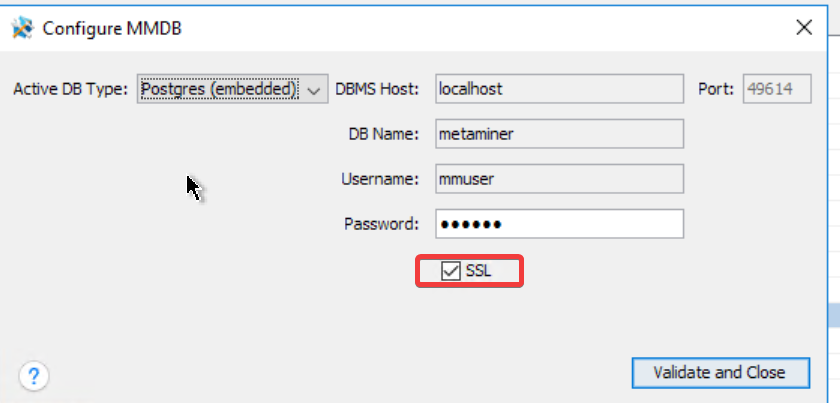
Image of the Configure MMDB dialog in the current release with the SSL check box ticked next to Port
../images/security/mma-configure-mmdb-ssl.png
Restrict which hosts can connect
The embedded database listens on the network so that reporting tools can read the MMDB directly. Allow only the hosts that need it.
- Open
server\data\mmdb\pg_hba.conf. - Find the comment
# Infolytik added for outside connectionsand the rules below it. - Replace the address in each rule with the hosts or subnets you allow, for example
10.20.30.0/24. To require SSL from those hosts, changehosttohostssl. - Keep the comment line. MetaMiner adds its default rules only when that line is missing.
- Restart the
InfolytikPostgresservice, or reload it withpg_ctl reload.
# Infolytik added for outside connections
hostssl all             all             10.20.30.0/24           md5
Also restrict port 49614 in the Windows firewall. See Network Exposure.
Verify
- In MMA, Configure MMDB > Validate and Close succeeds with SSL ticked.
- After the MetaMiner Server starts, the MetaMiner Client connects and shows data.
- Optional, with
psqlon the server:SELECT ssl, version FROM pg_stat_ssl JOIN pg_stat_activity USING (pid) WHERE application_name = 'INFOLYTIK-METAMINER';showstfor the MetaMiner Server's connections.
Troubleshooting
Validation fails after ticking SSL
- The database does not have SSL on. Check
ssl = onand the database log inserver\data\mmdb\logs. - The certificate name does not match Host. Use the name on the certificate.
root.crtis missing or holds the wrong CA for the account that validates.
The database service does not start after editing postgresql.conf
Check the file names in ssl_cert_file and ssl_key_file, that the key has no passphrase, and the log in server\data\mmdb\logs.